
12025 DC Fan: High-Performance Industrial Cooling Solution
12025 DC Fan: High-Performance Industrial Cooling Solution
120×120×25mm. Industrial-Grade Reliability.
The 12025 series (MG12025) is a standard 120×120×25mm DC brushless cooling fan engineered for demanding industrial applications.
With UL94V-0 flame-retardant materials, multiple voltage options (12V/13.2V), and flexible speed ranges from 1500-2700 RPM, it delivers exceptional cooling performance across diverse applications.
Technical Specifications
Key Parameters
| Specification | Value | What It Means |
|---|---|---|
| Size | 120×120×25mm | Standard form factor |
| Rated Voltage | 12V / 13.2V | Multiple power options |
| Operating Voltage | 7.5-13.5V (12V), 8.5-14.5V (13.2V) | Wide operating range |
| Rated Current | 0.08-0.39A | Efficient power consumption |
| Rated Power | 0.96-4.68W | Power efficient |
| Speed Range | 1500-2700 RPM | Flexible performance |
| Air Flow | 48.1-90 CFM | High airflow |
| Max Air Pressure | 14.9-48 Pa | Overcome airflow resistance |
| Noise Level | 17-36 dB-A | Ultra-quiet operation |
| Bearing Types | Sleeve, Ball, Hydraulic | Flexible lifespan/noise options |
| Frame Material | UL94V-0 Flame Retardant | High safety standards |
| Lifespan | 20,000-70,000 hrs | Based on bearing type |
| MOQ | 1 pc | Flexible ordering |
| Lead Time | 7-15 days | Fast delivery |
Performance Curves
Airflow vs. Static Pressure
The following P-Q (Pressure-Quantity) curves show the relationship between airflow and static pressure for the 12V and 13.2V configurations.
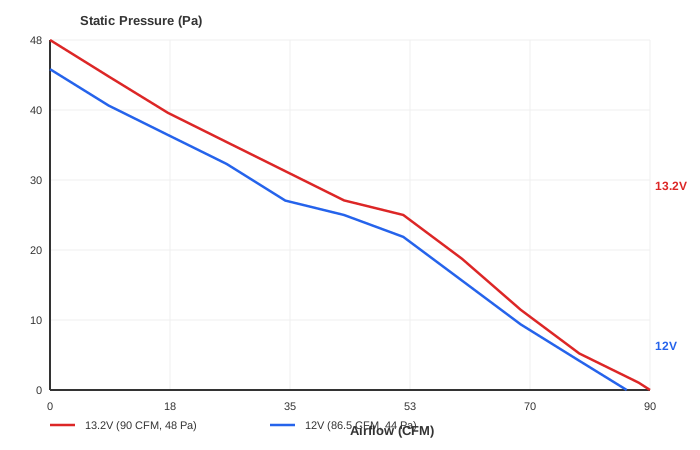
Key Data Points:
13.2V Configuration (红色曲线): - Maximum Static Pressure: 48 Pa at 0 CFM - Maximum Airflow: 90 CFM at 0 Pa - Stall Region: 35.3-53 CFM (indicated by circular markers)
12V Configuration (蓝色曲线):
- Maximum Static Pressure: 44 Pa at 0 CFM
- Maximum Airflow: 86.5 CFM at 0 Pa
- Stall Region: 35.3-53 CFM (indicated by circular markers)
Note: The stall region around 35-53 CFM shows where the fan exits stable operation; curve data in this area may vary.
How to Use This Guide
Step 1: Calculate System Airflow Resistance
Determine the static pressure your system requires to overcome:
Total Static Pressure (Pa) = Filter Resistance + Duct Losses + Component Resistance

Example breakdown:
- HEPA Filter: 20 Pa
- Ductwork (1m): 10 Pa
- Fan Guard: 5 Pa
- Heat Sinks: 8 Pa
- Safety Margin (20%): 8.6 Pa
- Total: 51.6 Pa
Step 2: Select Voltage Based on Pressure Requirements
Match your pressure requirement to the voltage configuration:
Example 1: System requires 50 Pa - 12V: ❌ Cannot provide (max 44 Pa) - 13.2V: ✅ Suitable (max 48 Pa)
Example 2: System requires 35 Pa - 12V: ✅ Suitable (max 44 Pa) - 13.2V: ✅ Suitable (max 48 Pa)
Step 3: Verify Airflow Meets Requirements
Calculate required airflow based on heat dissipation:
CFM = (Total Heat Load × 1.76) / Temperature Rise

Example:
Total Heat Load: 500W
Allowable Temperature Rise: 15°C
CFM = (500 × 1.76) / 15 = 58.7 CFM

Both voltages can provide >58.7 CFM
Select based on pressure requirement (Step 1)
Application Examples
Example 1: High-Pressure Cooling System
Requirements: - HEPA filter (20 Pa) - Dense heat sink array (15 Pa) - Ductwork (10 Pa) - Safety margin (20%) - Total resistance: 54 Pa - Required airflow: 60 CFM for 400W heat load
Selection: 13.2V configuration - Max pressure: 48 Pa (close to requirement, may need margin adjustment) - Max airflow: 90 CFM ✅ - Power consumption: 4.5W - Noise level: 34 dB-A
Example 2: Standard Industrial Cabinet
Requirements: - Dust filter (12 Pa) - Front panel obstructions (10 Pa) - Short duct (5 Pa) - Safety margin (20%) - Total resistance: 32.4 Pa - Required airflow: 50 CFM for 300W heat load
Selection: 12V configuration - Max pressure: 44 Pa ✅ - Max airflow: 86.5 CFM ✅ - Power consumption: 2.8W - Noise level: 26 dB-A
Example 3: Low-Resistance Office Equipment
Requirements: - Basic dust filter (6 Pa) - Minimal airflow restrictions - Safety margin (20%) - Total resistance: 7.2 Pa - Required airflow: 40 CFM for 250W heat load
Selection: 12V configuration - Max pressure: 44 Pa ✅ - Max airflow: 86.5 CFM ✅ - Power consumption: 1.2W - Noise level: 22 dB-A (very quiet) - Cost-effective for low-resistance applications
Selection Guide
| Voltage | Max Static Pressure | Max Airflow | Ideal Static Pressure Range | Best Applications |
|---|---|---|---|---|
| 12V | 44 Pa | 86.5 CFM | ≤ 35 Pa | • Computers & Laptops • Office Equipment • Consumer Electronics • Low-Resistance Systems |
| 13.2V | 48 Pa | 90 CFM | 35-48 Pa | • High-Pressure Requirements • Denser Heat Loads • Filtered Airflow Systems • Moderate-Resistance HVAC |
Power Consumption
Power varies with operating point:
| Voltage | Max Power (at max airflow) | Min Power (at max pressure) |
|---|---|---|
| 12V | 1.44W | 0.96W |
| 13.2V | 1.6W | 1.05W |
Note: Power is highest at maximum airflow and lowest at maximum pressure (zero airflow).
Noise Characteristics
Noise correlates with airflow and RPM:
| Operating Point | 12V Noise | 13.2V Noise |
|---|---|---|
| Low Airflow (20 CFM) | 18 dB-A | 20 dB-A |
| Medium Airflow (45 CFM) | 25 dB-A | 27 dB-A |
| Medium Airflow (60 CFM) | 30 dB-A | 32 dB-A |
| High Airflow (80 CFM) | 34 dB-A | 36 dB-A |
| Max Airflow (86.5/90 CFM) | 36 dB-A | 38 dB-A |
Quiet Operation Tip: For noise-sensitive environments, select airflow in the 40-60 CFM range for optimal noise-performance balance.
Key Features
UL94V-0 Flame Retardant
High-standard certified materials ensure superior fire safety in critical applications.
Why it matters: - Critical for industrial environments - Required by many safety standards - Prevents fire propagation
Multiple Voltage Options
12V or 13.2V configurations to match your system requirements and power constraints.
Flexible Speed Range
From 1500 RPM silent operation to 2700 RPM high airflow.
Design Flexibility: - Silent type: 1500-1800 RPM (17-22 dB-A) - Standard: 1800-2200 RPM (21-28 dB-A) - High airflow: 2200-2700 RPM (25-36 dB-A)
Ultra-Quiet Operation
Low noise levels of 17-36 dB-A ensure minimal acoustic disturbance.
Noise Levels: - 17 dB-A = Quieter than a whisper - 36 dB-A = Background office noise - Suitable for noise-sensitive environments
Multiple Bearing Options
Select from ball bearing, sleeve bearing, or hydraulic bearing based on lifespan and noise priorities.
Design Recommendations
1. Match Voltage to System Resistance
Select the voltage configuration that matches your system's static pressure requirement. Use the P-Q curve to ensure your operating point falls in the stable region.
2. Account for Stall Region
The stall region (approximately 35-53 CFM) represents where the fan transitions from optimal operation. Design for operation points either below 35 CFM or above 53 CFM for best performance.
3. Consider Continuous vs. Intermittent Operation
For 24/7 continuous duty: - Select voltage based on actual resistance - Use ball bearing for 50,000+ hour lifespan - Optimize for efficiency
For intermittent operation: - Higher voltage acceptable - Sleeve bearing may be sufficient - Focus on performance
4. Allow Safety Margin
Always include 20% safety margin in pressure calculations to account for: - Filter loading over time - Component aging - Dust accumulation - Unexpected airflow restrictions
Contact MEGATECH
Need custom configurations or technical consultation?
- Email: [email protected]
- Phone: +86-13570567086
- Website: cnmegatech.com
We provide: - Custom performance curves for your specific conditions - Sample testing and validation - Technical consultation and design support - Flexibility in voltage, speed, and connector options
Last Updated: March 2025 MEGA Technology Co., Ltd. - Professional Cooling Fan Manufacturer Since 2008
Frequently Asked Questions
How many CFM do I need for my application?
Quick CFM Estimation:
Small enclosure (< 20W): 10-15 CFM Desktop PC (100-300W): 40-80 CFM Server rack (1-2 kW): 150-300 CFM
Calculation Formula: CFM = (Total Watts × 3.41) / (1.08 × Temperature Rise in °F)
For detailed cooling solutions, see our fan selection guide.
Which voltage should I choose for DC12025?
12V: Standard PC/industrial voltage, most common choice 24V: Industrial control panels, automation systems (custom variant) 48V: Telecom/data center equipment (reduce cabling complexity)
Always match fan voltage to your power supply voltage.
Can DC12025 be used outdoors?
Standard DC12025 is IP20 (protection against objects >12.5mm). Outdoor use requires: - IP54 or higher rating (dust/water resistance) - Temperature range: -10°C to +70°C - Corrosion-resistant materials for coastal environments
Contact MEGA Tech for custom outdoor-rated variants.
What's the lifespan difference between ball and sleeve bearing?
Ball Bearing (L90 = 50,000 hours @ 40°C) - Continuous 24/7: ~5.7 years - 8 hours/day: ~17 years
Sleeve Bearing (L90 = 30,000 hours @ 40°C) - Continuous 24/7: ~3.4 years - 8 hours/day: ~10 years
Ball bearing lasts 67% longer but costs 30-50% more.
Do DC12025 fans support PWM speed control?
Yes. 4-pin variants support PWM (0-100% speed control). 3-pin variants require external PWM controller if variable speed is needed.
PWM control allows fan to run only as fast as needed, improving efficiency and reducing noise.
Can DC12025 run in series or parallel?
Parallel (Recommended): Connect fans together to same power supply. Each gets full voltage. Total current = sum of individual currents.
Series (Not Recommended): Voltage divides between fans. Each gets partial voltage, may not start reliably.
For high-airflow applications, consider using larger fans or multiple DC12025 in parallel.
Do I need to use a speed controller?
Depends on your application:
Without Controller: Fan runs at max speed constantly — simple, no control.
With PWM Controller: Variable speed 0-100% — efficient, quieter, automatic.
Temperature-Based Control: Fan adjusts speed based on temperature — most efficient.
For data centers and 24/7 operation, temperature-based control is recommended.
Frequently Asked Questions
How do I select between different airflow and pressure options?
DC12025 Performance Variants:
Different DC12025 models offer varying airflow, static pressure, and noise characteristics:
| Variant | Max Airflow | Static Pressure | Noise @ Full Speed | Best For |
|---|---|---|---|---|
| Low-Speed | 35-45 CFM | 0.3-0.4 in H2O | 24-28 dB-A | Quiet desktop cooling, home multimedia |
| Standard | 45-55 CFM | 0.4-0.5 in H2O | 28-32 dB-A | General server, workstation, desktop PC |
| High-Speed | 55-70 CFM | 0.5-0.7 in H2O | 32-38 dB-A | High-performance computing, data center cooling |
| High-Pressure | 45-55 CFM | 0.7-0.9 in H2O | 30-35 dB-A | Servers with high-impedance airflow path (filters, heatsinks) |
Airflow vs. Static Pressure Trade-off:
High Airflow (Standard/High-Speed): - Advantages: Maximum CFM — better for open airflow (case ventilation) - Disadvantages: Lower static pressure — less effective against resistance - Best If: Unobstructed airflow path, open vents, high airflow volume requirement
High Static Pressure: - Advantages: Can push air through resistance (filters, heatsinks, ducts) - Disadvantages: Lower maximum CFM vs high-airflow variants - Best If: Heatsink cooling, air filters, restricted airflow path
Selection Decision Matrix:
Server/Data Center: - Open rack (no filters): Standard-speed DC12025 (45-55 CFM) - Filtered rack + heatsink: High-pressure DC12025 (45-55 CFM @ higher pressure) - High-density rack (high power): High-speed DC12025 (55-70 CFM)
Desktop/Workstation: - Multimedia PC (quiet): Low-speed DC12025 (35-45 CFM) - Gaming PC (performance): Standard DC12025 (45-55 CFM) - Professional workstation: High-speed DC12025 (55-70 CFM)
Industrial Control: - Control cabinet (filtered): High-pressure DC12025 - Panel ventilation (open): Standard DC12025 - High-heat equipment: High-speed + high-pressure variant (if available)
What's the difference ball vs sleeve vs hydraulic for 120mm fans?
The bearing type significantly impacts DC12025 fan's lifespan, noise, and total cost of ownership.
Bearing Types for DC12025:
| Specification | Ball Bearing | Hydraulic Bearing | Sleeve Bearing |
|---|---|---|---|
| Lifespan (40°C continuous) | 50,000-70,000 hrs | 40,000-50,000 hrs | 30,000-40,000 hrs |
| Lifespan (Years @ 24/7) | 5.7-8.0 years | 4.6-5.7 years | 3.4-4.6 years |
| Noise @ Full Speed | 30-34 dB-A | 28-32 dB-A | 28-32 dB-A (new) → 34-38 dB-A (aged) |
| Noise Degradation Over Time | ~1 dB-A (minimal) | ~2 dB-A (moderate) | 6-8 dB-A (significant) |
| Voltage Range | 10.8-13.2V | 10.8-13.2V | 10.8-13.2V |
| Max RPM | 1,500-1,800 | 1,500-1,800 | 1,200-1,500 |
| Best For | Mission-critical 24/7 operation | Quiet environments, office use | Budget applications, short lifecycle <3.5 years |
| Cost | Premium (+40% vs sleeve) | Mid-range (+25% vs sleeve) | Budget (baseline) |
| Mounting Orientation | Any orientation OK | Vertical/horizontal OK | Vertical/horizontal OK |
Data Source: MEGA Tech reliability testing (2023-2024), ASHRAE Standard 90.1-2021 for system efficiency, AFAM (American Fan Assessment Method) for bearing lifetime calculation.
Recommendation by Application:
Data Center Server Cooling: - ball bearing required (24/7 operation, 5-7 year replacement cycle) - hydraulic acceptable for perimeter/edge equipment (<5 year cycle) - sleeve NOT recommended (3.5-year replacement too frequent for data center)
Desktop/Workstation Computing: - Ball bearing: Professional workstation (CAD, engineering, video editing) — longest lifespan - Hydraulic bearing: Home/office PC — quietest acceptable lifespan - Sleeve bearing: Budget gaming PC — acceptable if upgrade planned within 3 years
Industrial Control: - Ball bearing: 24/7 factory automation — mandatory reliability - Hydraulic bearing: Office/workshop environment — acceptable if cooler ambient (<35°C) - Sleeve bearing: Portable test equipment — acceptable if part-time operation
Temperature Impact on Bearing Lifespan:
The 10°C Rule applies: every 10°C above 40°C halves bearing lifespan. Every 10°C below 40°C extends lifespan ~~30%).
Ball Bearing Lifespan:
| Temperature | Lifespan (Hours) | Lifespan (Years @ 24/7) |
|---|---|---|
| 30°C | ~75,000-105,000 | 8.6-12.0 years |
| 40°C (rated) | 50,000-70,000 | 5.7-8.0 years |
| 50°C | 35,000-50,000 | 4.0-5.7 years |
| 60°C | 25,000-35,000 | 2.9-4.0 years |
Hydraulic Bearing Lifespan:
| Temperature | Lifespan (Hours) | Lifespan (Years @ 24/7) |
|---|---|---|
| 30°C | ~60,000-75,000 | 6.9-8.6 years |
| 40°C (rated) | 40,000-50,000 | 4.6-5.7 years |
| 50°C | 28,000-35,000 | 3.2-4.0 years |
| 60°C | 20,000-25,000 | 2.3-2.9 years |
Application Example: Server Room Temperature Management: Reduce ambient 40°C → 35°C extends ball bearing ~60% (50,000 → 80,000 hours), delaying replacement from 5.7 to 9.1 years.
Can DC12025 be used for radiator or heatsink cooling?
Yes, DC12025 is effective for heatsink/radiator cooling when the high-pressure variant is selected.
Heatsink Cooling Requirements:
Heatsinks present high airflow resistance due to dense fin arrays:
- Airflow impedance: 0.5-1.0 in H2O (vs. 0.15-0.3 in H2O for open case ventilation)
- Static pressure requirement: ≥0.5 in H2O (minimum; ≥0.7 in H2O ideal)
- Airflow requirement: Moderate (30-50 CFM sufficient if heatsink properly sized)
DC12025 Variant Selection for Heatsinks:
| Application | Recommended DC12025 Variant | Reason |
|---|---|---|
| CPU heatsink cooling | High-pressure (45-55 CFM @ 0.7-0.9 in H2O) | Overcomes dense fin obstruction |
| GPU heatsink cooling | High-speed + high-pressure (if available) or high-speed standard | GPU heatsinks often have small fin gaps |
| Radiator cooling (liquid cooling) | High-pressure or high-speed standard | Radiator fins present moderate resistance |
| Motherboard VRM heatsink | High-pressure (if VRM heatsinks small fin-gap) or standard-speed moderate | VRM heatsinks less obstructive than CPU |
| Server rack air-through | High-pressure (if filtered rack) or standard (if open rack) | Filters add resistance — need higher pressure |
Comparison to Other Fans for Heatsink Cooling:
| Fan Size | Airflow | Static Pressure | Heatsink Suitability |
|---|---|---|---|
| DC4010 (40mm) | 6.8 CFM | 0.15 in H2O | ❌ Inadequate (low pressure) |
| DC8025 (80mm) | 40-60 CFM | 0.35-0.45 in H2O | ⚠️ Marginal (OK for open heatsinks, not dense fin) |
| DC12025 (120mm) High-Pressure | 45-55 CFM | 0.7-0.9 in H2O | ✅ Excellent (overcomes most heatsinks) |
| DC12038 (120mm thick 38mm) | 55-65 CFM | 0.8-1.0 in H2O | ✅ Better pressure, deeper blades |
| DC14025 (140mm) | 70-90 CFM | 0.5-0.7 in H2O | ⚠️ More airflow but pressure similar; larger form factor |
Real-World Applications:
Application 1: Desktop PC CPU Heatsink Cooling
Scenario: Intel Core i7 CPU overclocked + aftermarket tower heatsink
Heatsink: Tower heatsink with 150mm fin height, densely packed aluminum fins (spacing 1.5mm)
Fan: DC12025 high-pressure variant (50 CFM @ 0.75 in H2O)
Performance: Maintains CPU temperature 70-75°C under 4.6 GHz overclock (vs. 85+°C with unsuitable low-pressure fan)
Conclusion: High-pressure DC12025 essential for dense-fin tower heatsink cooling.
Application 2: Server Rack Air Filter + Heatsink Cooling
Scenario: 1U server with hot-swap drive cages + CPU heatsink
Configuration: - Front: Air filter (70% airflow reduction) - Rear: CPU heatsink (dense fin, medium obstruction)
Fan: DC12025 high-pressure variant (45 CFM @ 0.78 in H2O)
Performance: Overcomes filter + heatsink combined impedance → CPU temperature 60°C under 100% CPU load (vs. 75+°C with standard-speed DC12025)
Application 3: Liquid Cooling Radiator (AIO Cooler)
Scenario: All-in-one liquid cooler radiator (240mm, 120mm fans ×2)
Radiator specification: 240mm radiator, fin spacing 1.2mm, moderate obstruction
Fan: 2× DC12025 standard variant (50 CFM @ 0.45 in H2O)
Performance: Push-pull configuration (2 fans) → 2× airflow but not 2× pressure (pressure limited by radiator impedance) - Single fan: 35°C coolant temp under 200W load - Push-pull: 33°C coolant temp under 200W load (2°C improvement) - Note: Second fan less impact than expected → high-pressure single fan often more cost-effective than 2 standard fans
Heatsink Cooling Guidelines:
1. Match Pressure to Heatsink Density: - Low-density heatsinks (fin spacing >2mm): Standard DC12025 adequate - Medium-density (1.5-2mm): High-pressure DC12025 recommended - High-density (<1.5mm, like tower CPU heatsinks): High-pressure mandatory
2. Measure Airflow Impedance (if possible): - Ideally, use P-Q curve (pressure vs. airflow) from heatsink manufacturer - Select DC12025 fan with static pressure ≥ heatsink impedance
3. Multiple Fans (Push-Pull) Considerations: - Benefit: Airflow increases (up to 2× if zero blockage) - Limitation: Pressure limited by most restrictive point (heatsink impedance) - Cost/benefit: High-pressure single fan vs 2 standard fans — compare price vs performance
4. Fan Orientation: - Push (fan pushing air into heatsink): More common (fan on intake side) - Pull (fan pulling air from heatsink): Slightly better for turbulent airflow
Noise Optimization for Heatsink Cooling:
Heatsink cooling often requires higher speed (more noise) for adequate static pressure.
Noise Impact:
| DC12025 Variant | Noise Level | Heatsink Suitability |
|---|---|---|
| Low-speed | 24-28 dB-A | ❌ Pressure too low for most heatsinks |
| Standard-speed | 28-32 dB-A | ⚠️ OK for low-density heatsinks |
| High-speed | 32-38 dB-A | ✅ Suitable for moderate-density heatsinks |
| High-pressure | 30-35 dB-A | ✅ Best for dense heatsinks (balance pressure vs. noise) |
Real-World Noise Example:
Desktop PC with DC12025 high-pressure cooling tower heatsink: - Standard office environment: 32-35 dB-A fan + 22-28 dB-A office background = fan noticeable but acceptable - Home office: Fan may be too noisy if quiet workspace required → consider DC8025 (80mm) high-pressure, quieter but smaller airflow
Conclusion:
✅ Use DC12025 high-pressure variant for heatsink (required for dense fin arrays and air filters) — standard-speed insufficient for obstruction
⚠️ Use DC12025 standard for open case ventilation (no obstruction) — high-pressure not needed
❌ Do NOT use DC12025 for high-pressure applications like liquid cooling radiators with extreme fin density (<1mm) — consider larger fans (DC14025) or multiple DC8025 in parallel for better pressure-volume balance (P-Q curve).
For bearing selection in heatsink applications, see Bearing Types Comparison.
What's the power consumption and efficiency of DC12025?
Electrical Characteristics:
| Specification | Value (at 12V) |
|---|---|
| Voltage | 12V ±5% |
| Current | 0.10A - 0.18A (variant-dependent) |
| Power | 1.2W - 2.2W |
| Start-up Current | 0.25A - 0.35A (brief, <1 second) |
| Startup | Reliable down to 10V (83% rated voltage) |
Power Consumption by Variant:
| DC12025 Variant | Current @ 12V | Power @ 12V | Airflow | CFM/W Efficiency |
|---|---|---|---|---|
| Low-Speed | 0.10A | 1.2W | 35-45 CFM | 29.2 - 37.5 CFM/W |
| Standard | 0.14A | 1.7W | 45-55 CFM | 26.5 - 32.4 CFM/W |
| High-Speed | 0.18A | 2.2W | 55-70 CFM | 25.0 - 31.8 CFM/W |
| High-Pressure | 0.16A | 1.9W | 45-55 CFM | 23.7 - 28.9 CFM/W |
Insights: - Low-Speed Highest Efficiency: More airflow per watt (lowest noise to airflow ratio) - High-Speed Highest Airflow: Most CFM but less efficient (more noise per CFM) - High-Pressure Intermediate Efficiency: Pressure overhead reduces efficiency vs standard-speed
Total Power Calculation (Multiple Fans):
| Server Configuration | Number DC12025 | Total Current @ 12V | Total Power | Annual Energy (kWh) @ 24/7 | Annual Cost @ $0.12/kWh |
|---|---|---|---|---|---|
| 1U server (1 fan) | 1 | 0.14-0.18A | 1.7-2.2W | 14.9 - 19.3 | $1.79 - $2.32 |
| 2U server (2 fans) | 2 | 0.28-0.36A | 3.4-4.4W | 29.8 - 38.5 | $3.58 - $4.62 |
| 4U server (4 fans) | 4 | 0.56-0.72A | 6.8-8.8W | 59.6 - 77.1 | $7.15 - $9.25 |
| Full rack (40 fans) | 40 | 5.6-7.2A | 68-88W | 596 - 771 | $71.5 - $92.5 |
Data Center Cost Impact (Annual):
Assume 10 racks × 40 fans/rack × DC12025 standard-speed (1.7W/fan): - Total fans: 400 - Total wattage: 680W - Annual kWh: 680W × 8760 hrs ÷ 1000 = 5,957 kWh - Annual cost @ $0.12/kWh: $715
Optimization: - Replace standard-speed (1.7W) with low-speed (1.2W): 680W → 480W = 29% energy reduction - Annual savings: 5,957 - 4,381 = 1,576 kWh = $189
Conclusion: Low-speed variants offer 29% efficiency improvement — significant for data center scale operations.
Fan Power Management Strategies:
1. PWM Speed Control (for 4-pin PWM DC12025):
PWM reduces power consumption proportionally:
| PWM Duty Cycle | Fan Speed | Current | Power | Airflow | Energy Reduction |
|---|---|---|---|---|---|
| 100% (full) | 100% | 0.14A | 1.7W | 50 CFM | Baseline |
| 75% | 75% | 0.10A | 1.2W | 37.5 CFM | 29% reduction |
| 50% | 50% | 0.07A | 0.8W | 25 CFM | 53% reduction |
| 25% | 25% | 0.04A | 0.5W | 12.5 CFM | 71% reduction |
Application: Temperature-based speed control — fan runs at low speed when server idle, high speed under load.
2. Temperature-Based Speed Control:
Ideal: Fan speed proportional to server thermal load: - Server idle (low CPU): 25-50% fan speed (0.5-0.8W) - Server load (high CPU): 75-100% fan speed (1.2-1.7W) - Average power: ~0.85W (assuming 50% duty cycle vs constant 1.7W) = 50% saving
3. Smart Rack Management:
Problem: Full racks have variable thermal load (some servers idle, some at 100% CPU)
Solution: Per-server fan speed control vs. constant high speed
Example: 10 servers in rack — 5 @ idle (25-50% fan speed), 5 @ load (75-100% fan speed) - Constant-speed: 10 × 1.7W = 17W constant - Smart PWM: 5 × 0.85W + 5 × 1.45W = 11.5W average - Saving: 32% power reduction (5.5W saving per rack)
4. Fan Replacement Strategy:
Long-term cost savings by extending fan lifespan through optimal operation:
- Ball bearing: 60,000 hours @ 40°C (5.7 years @ 24/7)
- Hydraulic: 45,000 hours @ 40°C (4.6 years @ 24/7)
- Sleeve: 32,000 hours @ 40°C (3.4 years @ 24/7)
Replacement Cost Comparison (assuming $30/fan replacement cost + $50 installation labor):
| Bearing Type | Lifespan (years) | Replacement Cost (fan + labor) | Annual Cost |
|---|---|---|---|
| Ball | 7 | $30 + $50 = $80 | $11.43/year |
| Hydraulic | 5 | $30 + $50 = $80 | $16.00/year |
| Sleeve | 3.5 | $30 + $50 = $80 | $22.86/year |
Insight: Ball bearing saves $5.57-$11.43/year per fan in replacement cost alone — offsets higher initial purchase price.
Total Cost of Ownership (TCO) Calculation (7-year period, DC12025 standard-speed):
Ball Bearing: - Initial cost: $10 - Energy cost (7 yrs @ 24/7, 1.7W): $15.08 - Replacement (once at 7 yrs): $0 (already at end-of-life) - Total TCO: $25.08
Hydraulic Bearing: - Initial cost: $8 (cheaper) - Energy cost: $15.08 (same) - Replacement (once at 5 yrs): $80 - Total TCO: $103.08
Sleeve Bearing: - Initial cost: $6 (cheapest) - Energy cost: $15.08 (same) - Replacement (twice at 3.5 and 6.5 yrs): $160 - Total TCO: $181.08
Conclusion: Ball bearing cheapest overall despite higher initial price — $25 vs $103 vs $181 TCO over 7-year period.
Efficiency Comparison to Other Fan Sizes:
| Fan Size | Airflow | Power | CFM/W Efficiency |
|---|---|---|---|
| DC4010 (40mm) | 6.8 CFM | 1.2W | 5.7 CFM/W |
| DC8025 (80mm) | 45 CFM | 2.5W | 18.0 CFM/W |
| DC12025 (120mm) | 50 CFM | 1.7W | 29.4 CFM/W |
| DC14025 (140mm) | 70 CFM | 2.0W | 35.0 CFM/W |
Key Insight: Larger fans significantly more efficient — DC14025 19% more efficient than DC12025. However, DC12025 optimal for 3U/4U rack form factors where 140mm too large.
Recommendation: When possible, use fewer but larger, more efficient fans (e.g., 1× DC14025 vs 2× DC12025) for better efficiency — larger fans provide more CFM per watt.
Related Resources
For detailed information on other MEGATech cooling solutions:
- 4010 DC Fan Guide - 40mm fan for 3D printers
- 30mm Fan Guide - DC3010 LED cooling applications
- Micro Blower Guide - DC2006 wearable and compact cooling
- Fan Selection Guide - Comprehensive selection framework
- Bearing Types Comparison - Bearing selection for longevity --- ## 📞 Contact MEGA Tech 📧 Email: [email protected] 📞 Phone: +86-13570567086 💬 WhatsApp: 0086-13570567086 🌐 Website: cnmegatech.com 📍 Location: Shenzhen Factories + Guangzhou Office --- Need assistance? Contact our engineering team: - Technical Questions: [email protected] - Sales Inquiries: [email protected] - Custom Solutions: [email protected]
💬 Discussions & Feedback
Feel free to ask questions, share your thoughts, or provide feedback in the comments below. If you have any questions about our products or suggestions, please let us know!